
Guests are Duplicating on My Guest List
If you are seeing duplicate guest entries on your guest list, such as both an RSVP entry and a booked entry for the same guest, this is usually caused by mismatched information during the booking process.
Why Duplicate Entries Appear
Duplicate entries occur when the information entered in the RSVP does not exactly match the information the guest uses when booking their reservation. This can include differences in:
-
First or last name
-
Email address
-
Phone number
Because the information does not match perfectly, the system treats the RSVP and the new booking as two separate people. When there is conflicting information the system cannot automatically recognize that both entries belong to the same guest.
How to Fix Duplicate Guest Entries
To resolve this issue:
-
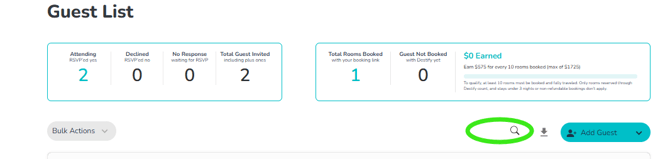
Locate both entries on your guest list using the search bar feature. Circled in green
-
Delete the RSVP entry.
-
Keep the booked entry.
*We have a screenshot showing an example below
Booked guests are what matter most when tracking reservations and managing your guest count, so those entries should always remain. Once a guest has booked there is no use for the RSVP.
The screenshot below shows an example of a guest whose RSVP did not convert to a booked entry because the information did not match exactly.
Keep the entry that shows an RSVP status of Attending and a room status of Booked. This entry is indicated by a green circle.
Delete the original RSVP-only entry by clicking the red trash can on the far right of that entry. Indicated by the red circle
How to Prevent Duplicate Entries in the Future
-
Enter full names. Do not use nicknames or titles like mom, dad, uncle, and aunt when entering the guests' RSVP
-
Avoid entering RSVP information you don't know. The guest's name is the only required field when submitting an rsvp entry. You can always leave a space blank and have the guest fill in the missing information on their own accord later via a request missing info message that can be sent directly via your guest list, or the info will be filled in later after they book.
-
Still need assistance? Here's how to reach us
- Contact us here, or for urgent requests, please call us at 844-948-3911
- Manage your booking details through your Dashboard