
Adding airport transfers to your reservation is quick and easy through your Destify dashboard. Transfers ensure you have transportation between the airport and your resort, based on your flight details.
Please note that you can only add your flight details within 45 days from travel.
Step-by-Step Instructions
-
Log in to your dashboard at:
https://app.destify.com/log-in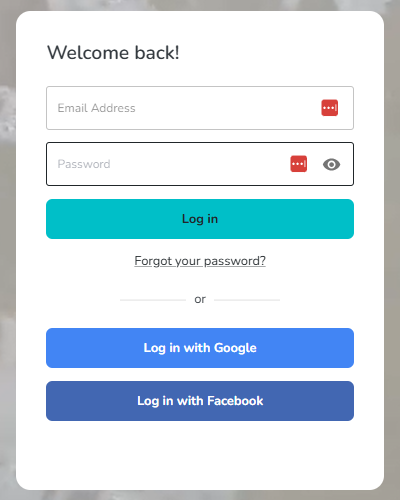
-
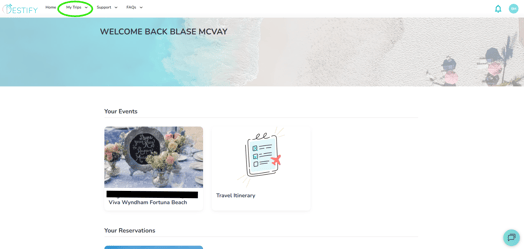
Click “My Trips” in the top left-hand corner.
-
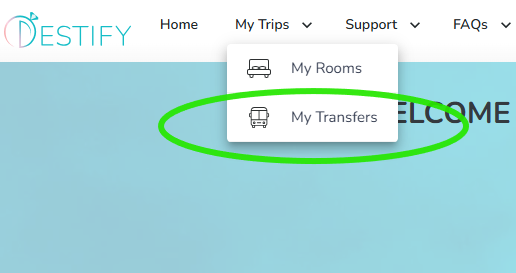
Select “My Transfers.” This will open your transfers page.
-
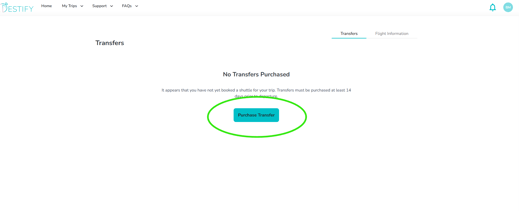
Click the large blue “Purchase Transfers” button in the center of the screen.
-
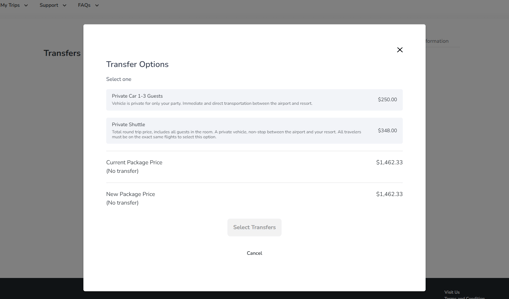
Choose your preferred transfer option and complete your payment.
-
After your transfers are confirmed, go to the “Flight Information” tab and enter your flight details. Although you do not have to enter your flight information right away. It's a good idea to have your flight info submitted a minimum of 2 weeks prior to travel to avoid any last minute issues.

Transfers must be purchased at least 14 days prior to departure.
Important Reminders
-
Your transfers are scheduled based on your flight information, so it is very important to submit your flight details as soon as possible.
-
If flight information is not provided, your transfers cannot be properly arranged.
-
You will need your flight info entered 2 weeks before travel.
-
You receive your official transfer details Four Days before travel.
-
You can view your transfer information anytime through your dashboard once it becomes available. We suggest taking a screenshot so that the info is available to you even if you are without cell service
Still need assistance? Here's how to reach us
Contact us here, or for urgent requests, please call us at 844-948-3911
Manage your booking details through your Dashboard